Kept
A Mac app that backs up your Apple Photos library to a drive you own. Free and open source.
How it works
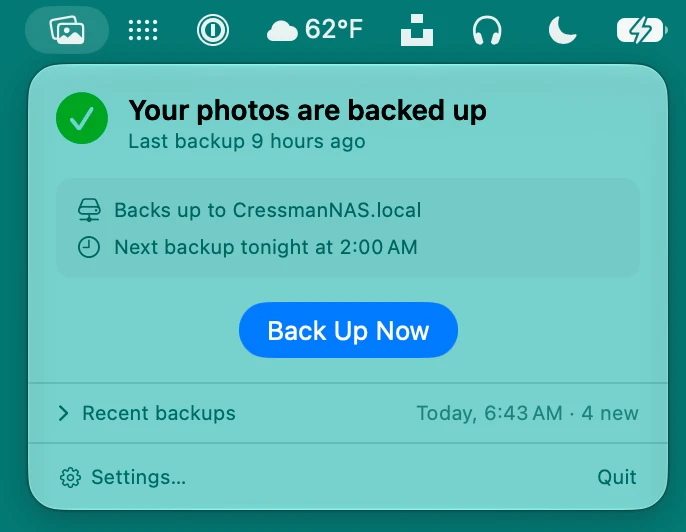
iCloud keeps your Apple Photos library synced, but it all depends on one account. Kept makes a second copy on a drive you own, like a NAS, an external drive, or another disk. It runs from your menu bar and backs up on a schedule.
- Set it up. Open Kept, give it access to your Apple Photos library, and choose a backup folder.
- Pick a schedule. Nightly, weekly, or manual.
- Let it run. At the scheduled time, Kept checks your whole library and copies only what's changed. It tells you if something needs your attention.
Good to know
- Kept only backs up photos stored on your Mac, not ones that are only in iCloud. In Apple Photos, go to Settings → iCloud and turn on Download Originals to this Mac.
- If your Mac is asleep, offline, or on battery at backup time, Kept backs up as soon as it can.
- Your backup is plain photos and videos in date folders, so you can always open it without Kept.
- Configure how long photos you delete stay in the backup, up to a year.
Why I made this
My parents gave me my first camera when I was 8, and my photo library has been my most prized possession ever since: close to 40,000 photos and videos, spanning more than three decades. Losing it would be devastating.
I'm all in on Apple Photos, and iCloud keeps my library synced and backed up. But if Apple ever made a mistake, like wrongly locking my account, I could lose access to all of it at once. I wanted a second copy that didn't depend on anyone's proprietary storage.
I already had a NAS with terabytes of free space, so I decided to build something myself. Building Kept was a fun way to learn macOS development and agentic coding while solving a real problem of my own. I had a blast, and I hope it gives you the same peace of mind it's given me.
I'm Chip Cressman, an engineering leader in Seattle and a lifelong photographer.
Privacy
I care a lot about privacy, and I build everything with that in mind. Kept has no analytics, no tracking, no ads, and no account. Your photos are copied only to the backup folder you choose.
The only thing Kept sends anywhere is a daily check with GitHub for a new release. It sends nothing about you or your library, and you can turn it off in Kept's settings.
Kept is signed with my Apple Developer ID and notarized by Apple. The code is on GitHub (opens in a new tab) if you want to check for yourself.
Requirements
- Apple silicon and macOS 26 or later.
- Full Disk Access for Kept, so it can read your Apple Photos library. Kept's setup walks you through turning it on.
- Enough space for your library, on your Mac, an external drive, or a network drive.
Support
If something isn't working, please let me know by opening an issue on GitHub (opens in a new tab). It helps to include your macOS version, where your backup folder is, and any other helpful information.
Built with
The copying is done by osxphotos (opens in a new tab), which ships inside Kept, so there's nothing else to install.